How to Change Your Password on Volecom
Prerequisites
- Make sure you are logged in to your Volecom account.
- If you forgot your password, please use the "Forgot Password" feature at: https://my.volecom.com/sign-in
Steps to Change Password
1. Open the Change Password Page
Go to the following link: https://my.volecom.com/profile?tab=change-password
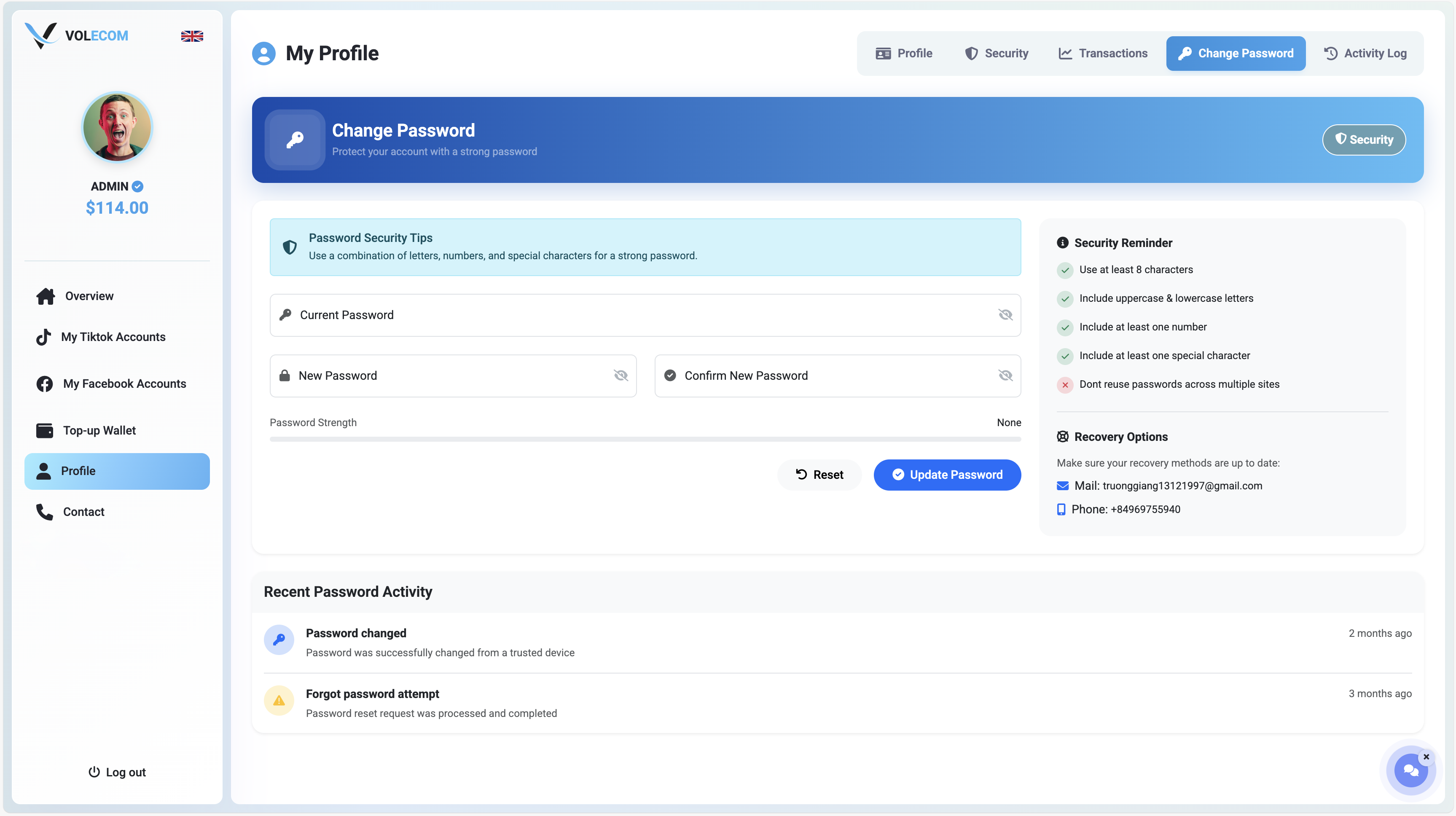
2. Enter Current Password
In the "Current Password" field, enter your existing password.
3. Enter New Password
In the "New Password" field, enter your new desired password.
4. Confirm New Password
Re-enter your new password in the "Confirm New Password" field.
5. Save Changes
Click the Save or Update button to apply the changes.
Password Requirements
- At least 8 characters in length.
- Should include a mix of:
- Uppercase and lowercase letters
- Numbers
- Special characters (e.g.
!@#$%^&*) - Avoid using easy-to-guess information such as your name or birthdate.
- Do not reuse previous passwords.